
How to Use a Morse Code Generator on Phone?
There’s something strangely satisfying about turning normal text into dots and dashes. Maybe it’s the secret-message feeling. Maybe it’s the old-school communication style. Either way, people still enjoy experimenting with Morse code, and phones make it incredibly easy now. Lets Learn How to Use a Morse Code Generator on Phone? in detail in this guide.
A Morse Code Generator on Phone can convert words into Morse signals within seconds. You type a message, and the app instantly transforms it into flashes, sounds, vibration patterns, or Morse symbols. Some apps even let you decode signals back into text, which feels surprisingly fun the first time you try it.
A lot of beginners start with a simple morse code generator because it removes the hard part of memorizing every letter immediately. Instead of staring at charts for hours, you can practice naturally by typing real words and watching how they convert into Morse code.
Things get more interesting once people pair these tools with a morse code image decoder. Some apps can interpret blinking lights, screenshots, or Morse symbols from images. It sounds a little nerdy at first, honestly, but once you try decoding a hidden message from a flashlight signal, it becomes weirdly addictive.
What Is a Morse Code Generator on Phone?
A Morse Code Generator on Phone is an app or mobile tool that converts regular text into Morse code.
Most generators support:
- Text-to-Morse conversion
- Morse audio playback
- Flashlight signaling
- Vibration patterns
- Morse decoding
- Copy-and-share features
Some apps are designed for learning, while others focus on emergency communication or radio hobby use.
The good thing about phone-based tools is convenience. You don’t need radio equipment or technical knowledge anymore. If you can type a message, you can generate Morse code.
Why People Still Use Morse Code Apps
At first glance, Morse code feels outdated. Then you realize how many people still use it for hobbies, learning, games, and communication practice.
Some common reasons include:
Learning a New Skill
Many people enjoy learning Morse code simply because it’s different from modern communication methods.
It trains memory and listening skills in a surprisingly engaging way.
Ham Radio Communication
Radio operators still use Morse code regularly. A phone generator helps beginners practice signals before using real equipment.
Secret Messages
Kids and teenagers especially enjoy sending hidden messages to friends.
It feels more personal than standard texting.
Emergency Preparedness
Some survival enthusiasts learn Morse code because basic signals can work when voice communication fails.
The SOS signal remains one of the most recognized emergency codes in the world.
Educational Activities
Teachers sometimes include Morse code educational activities during communication or history lessons. Kids usually enjoy interactive learning more than textbook reading.

How to Use a Morse Code Generator on Phone
The actual process is pretty simple.
Most apps follow nearly the same steps.
Step 1: Download a Morse Code App
Search your app store using terms like:
- Morse code translator
- Morse code generator
- CW practice app
- Morse signal tool
Choose an app with good reviews and clean controls.
Some free apps work perfectly fine for beginners.
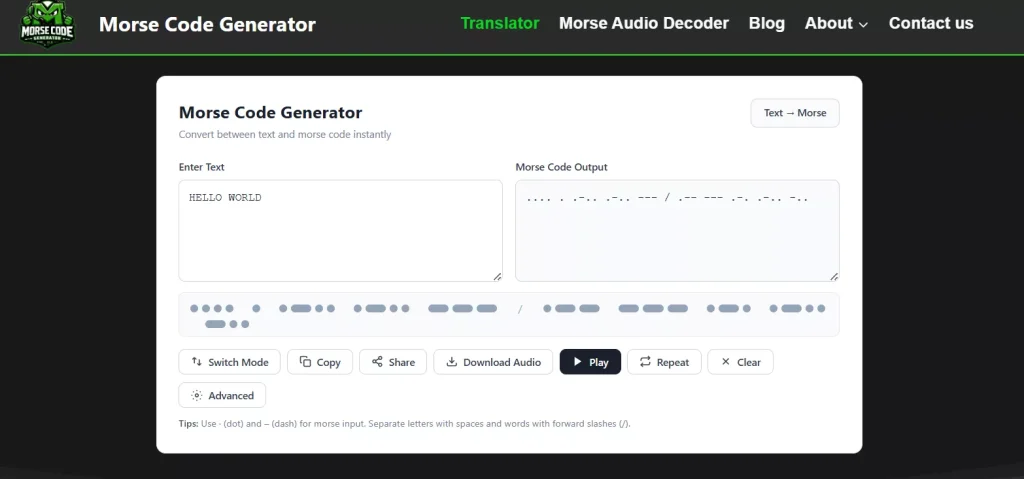
Step 2: Type Your Message
Open the app and enter text normally.
For example:
- HELLO
- SOS
- SECRET MESSAGE
- YOUR NAME
The app instantly converts the message into dots and dashes.
Step 3: Choose Output Style
This part is usually the fun part.
Most generators allow:
- Sound beeps
- Flashlight blinking
- Screen flashing
- Vibrations
- Visual Morse symbols
Kids especially enjoy flashlight mode because it feels like a spy gadget.
Step 4: Practice Reading Morse Code
Don’t just generate messages. Try reading them too.
Start with easy Morse code for beginners:
- E = .
- T = –
- A = .-
- S = …
You’ll recognize patterns faster than expected.
Step 5: Experiment With Real Messages
Once you understand basic symbols, try:
- Sending hidden notes
- Morse code puzzles
- Tap code games
- Flashlight communication
- Sound-based decoding
This is usually when learning becomes enjoyable instead of feeling technical.
Features to Look For in a Morse Code Generator App
Not every app works the same way.
Some are overloaded with ads or confusing menus.
A good Morse Code Generator on Phone should include:
Audio Playback
Listening to Morse tones improves memory quickly.
Adjustable Speed
Beginners need slower playback speeds.
Flashlight Signaling
This feature turns your phone into a visual Morse communicator.
Decoder Mode
Some apps can decode Morse sounds back into text.
Offline Access
Helpful if you’re practicing outdoors or during travel.
Morse Alphabet Chart
Having the alphabet visible helps beginners learn naturally.
Honestly, simple apps usually work better than overly complicated ones.
Morse Code Learning Tips for Beginners
Learn Common Letters First
Start with:
- E
- T
- A
- S
- O
They appear frequently and are easier to memorize.
Practice Daily for a Few Minutes
Short sessions work better than long ones.
Ten minutes a day is usually enough for steady improvement.
Use Sound Patterns
Morse code becomes easier once your brain recognizes rhythm instead of individual symbols.
Play Games
Fun Morse code games make practice feel less repetitive.
Children especially respond well to:
- Morse scavenger hunts
- Secret note challenges
- Flashlight communication races
Use Real Words
Random letters become boring fast.
Practice names, greetings, and simple phrases instead.
Morse Code for Kids on Phones
Phones actually make Morse Code for Kids easier than older teaching methods.
Children enjoy:
- Flashing lights
- Beeping sounds
- Secret messages
- Interactive decoding
Many educational apps include:
- Morse code flashcards for kids
- Beginner Morse code lessons
- Morse code sound practice
- Decode Morse code games
- Printable Morse code charts
Some apps even gamify learning with rewards and mini challenges.
That playful approach keeps attention longer.
Can Phones Decode Morse Code Too?
Yes, many apps work both ways.
A Morse decoder listens to:
- Audio recordings
- Live beeping sounds
- Flashlight signals
- Tap rhythms
Then it converts those signals into readable text.
Accuracy depends on sound quality and timing consistency, though.
Messy signals confuse software pretty quickly.
Humans actually outperform apps sometimes when background noise gets bad.
Is Morse Code Secure?
People often wonder: is morse code secure? Yes! But untill Someone detects it. Morse code is simply another communication format. It doesn’t encrypt information automatically. If someone understands Morse patterns, they can decode the message.
That said, casual Morse communication still feels private because most people around you probably won’t recognize it instantly.
Historically, military groups added encryption systems on top of Morse code to protect sensitive messages. Without extra coding layers, basic Morse isn’t considered secure communication.
Does Morse Code Support Multiple Languages?
A lot of beginners assume Morse code only works for English letters. But does morse code support multiple language systems? Yes. International Morse code includes additional characters for various languages and accented letters.
Some Morse apps support:
- Spanish
- French
- German
- Russian
- Scandinavian alphabets
The structure stays mostly the same while symbol sets expand slightly.
That flexibility helped Morse code spread internationally during the telegraph era.
Common Mistakes Beginners Make
Going Too Fast
People often increase playback speed too early.
Slow practice builds stronger recognition skills.
Memorizing Charts Only
Morse works better through listening and repetition than visual memorization alone.
Ignoring Timing Gaps
The pauses matter just as much as the dots and dashes.
Using Poor Audio
Cheap recordings with heavy background noise make decoding frustrating.
Practicing Random Letters
Real words improve memory faster than isolated characters.
Pros and Cons of Using a Morse Code Generator on Phone
Pros
- Easy for beginners
- Portable learning tool
- Supports audio and visual signals
- Great for kids and students
- Helps with Morse practice anywhere
- Useful for hobby radio operators
Cons
- Some apps contain excessive ads
- Poor-quality apps decode inaccurately
- Flashlight mode drains battery
- Beginners may rely too heavily on automation
Most people eventually combine app learning with manual practice.
That balance helps Morse patterns stick naturally.
Safety Tips While Using Morse Apps
Most Morse code apps are harmless, but a few practical precautions matter.
Avoid Distracted Use Outdoors
Don’t practice Morse signaling while walking near roads or traffic.
Be Careful With Flashlight Use
Bright flashlight signaling can annoy others or strain eyes in dark spaces.
Download Trusted Apps Only
Some unofficial apps request unnecessary permissions.
Stick with reputable developers whenever possible.
Supervise Young Kids Online
If children use Morse learning apps, parents should monitor downloads and in-app ads.
That’s pretty standard advice for any educational app, honestly.
Real-Life Ways People Use Morse Code on Phones
You’d be surprised how many creative uses exist.
People use Morse apps for:
- Classroom activities
- Camping games
- Escape room puzzles
- Amateur radio training
- Secret message competitions
- Learning communication history
- Accessibility experiments
Some users even customize phone vibrations for Morse-based notifications. That takes patience, but it’s a cool idea.

Why Morse Code Still Feels Interesting
Part of the appeal is simplicity.
Modern communication depends heavily on internet access, apps, accounts, and complex systems.
Morse code strips communication down to rhythm and timing.
A sound. A flash. A pause.
That’s enough to carry meaning across distance.
There’s also something satisfying about understanding signals most people ignore completely.
Once your brain recognizes Morse patterns, random beeps suddenly stop sounding random.
Final Thoughts
Using a Morse Code Generator on Phone is one of the easiest ways to explore Morse code without expensive equipment or technical training.
You can practice signals, send secret messages, decode sounds, and learn communication patterns directly from your phone within minutes.
The best part is how flexible these tools are.
Kids use them for games and learning activities. Radio operators use them for training. Hobbyists enjoy decoding challenges. Some people simply like the old-school feeling of communicating through sound and rhythm.
And honestly, there’s something fun about turning an ordinary phone into a tiny telegraph machine. Once you start experimenting with dots and dashes, it becomes surprisingly hard to stop.